Why Should I Automate User Provisioning with Auto IDM?
UncategorizedAutomatically create accounts in your IT systems and remove the manual busywork that slows teams down.
Automatically create accounts in your IT systems
The goal of this write up is to describe the user provisioning problem and how Auto IDM's approach can help solve it. Our long term mission is for every business to automate user provisioning, but today that is not possible for everyone.
Do not know what an HR management system is, or an IT system? Hop to the definitions section here. Otherwise, read on.
Sections:
What is user provisioning?
User provisioning is creating, updating, modifying, disabling, and deleting accounts. An employee's life cycle stages throughout their time at your organization looks something like this:
Stages
- Onboard
- Changes over time
- Offboard
Employee Lifecycle Diagram
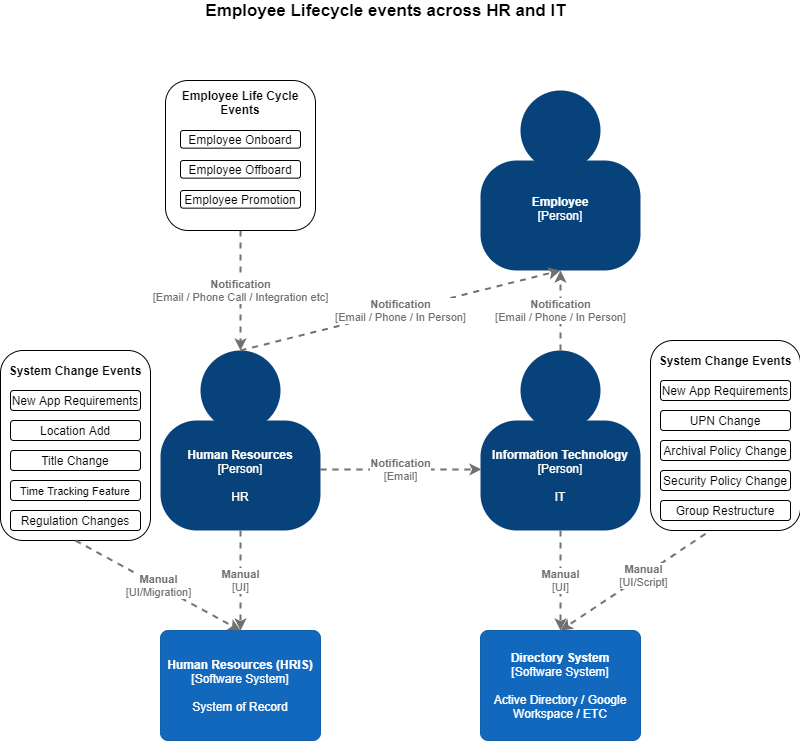
Onboarding and offboarding tasks happen for every employee. In your organization, there is a checklist with a bunch of steps to onboard someone, and the steps are about 30% HR, 50% IT; the rest are Finance, Legal, and more. The core problem is that each team's systems do not talk to one another, so there is not a clear system of record. It is fairly obvious that HR should be in control of the system of record for everything about employee information. Due to a lack of integration between systems, we end up with systems that have to get updated manually when HR needs to make a change. This means every change leads to an urgent and important activity for IT.
Automation allows for your directory system to stay up to date with HR.
We will go over what each step probably looks like in your organization if you are not automated.
Onboard
Your HR team sends an email or submits a ticket that looks something like this:
Subject: New Employee Starting Tomorrow
- First Name
- Last Name
- Department
- Title
- Email Address (What is the rule for email addresses? First initial + last name)
- What should this account have access to? (Groups)
- Do they need access to the company shared folder?
- Do they need access to accounting software?
- Do they need access to the CRM?
- Where do I send their initial password?
- Start date?
- What office are they at? Michigan? South Carolina? Florida?
- Full time?
- Contractor?
- End date?
- Manager?
- Etc.
Normally, this process is not as clean because HR does not have all of the information at the time of the hire. A title may change, the department may be moved around, and so on. The one constant with hiring is there are always changes to the process. IT takes this information and puts it into the identity provider. This generally is a list of 10-20 steps that includes:
- User creation
- Adding the user to all the necessary groups (possibly copying from another similar employee)
- Waiting for the email to be created
- Initial password
- Sending an email to the new employee's manager with the credentials
- Provisioning a new computer, imaging the computer, prepping the apps for the computer (for a Windows shop, Windows AutoPilot attempts to solve this as well; with Azure, it is looking more and more possible - https://docs.microsoft.com/en-us/mem/autopilot/windows-autopilot)
- Etc.
Changes over time
There are a number of HR and employee-related actions that trigger changes on the IT side of the house.
- Position change in the company
- Name change (marriage)
- Location change
- Merger and acquisition (rare but automation makes this a lot easier)
The most common changes are actually company-wide changes that impact the identity provider.
- Group adds or removes that link to HR groups
- Mass field changes (upn or proxyaddress, picture updates, office moves, and more)
- Restructuring of groups or role mappings (what groups does engineering need access to?)
- How long to keep old accounts for archival reasons
- Email address domain name change
- Any mass field change
Offboard
For the most part, offboarding is the same as onboarding in reverse, with a few additional tasks.
- Security issues - potentially rogue employees are an issue as 50% of companies have ex-employees who still have access to company data. This was written by OneLogin here. With automation, the account can be disabled the instant HR marks them as offboarded.
- Archival of ex-employees' data. What is your archival process?
How does Auto IDM solve this problem?
A fully managed solution means the following:
- No software to maintain
- No configuration to configure or update
- No updates to maintain
- Proven implementation process that gets to the finish line at your business's pace
- Support includes the full end-to-end process
- User provisioning is supported by a company, not just a single person on your team
- Solution is hands-off
- Your team now has access to a dedicated team focused on user provisioning and data integration
Cost scales with your business size as the complexity of user provisioning tends to scale with the number of employees. Therefore, if you have a low employee count, your price is very affordable. 30 employees times $25 per year equals about $800. 200 employees times $20 per year. 1000 employees times $15 per year. Pricing is flexible, and we also offer monthly pricing.
We know that a fully managed solution is the best long-term solution, because the HR landscape is changing dramatically. Over time, with the rapid pace of innovation in technology, the HR and IT providers are going to continue to change.
Our cost structure also drives us to be more efficient and care about the same problems our customers care about. They want the solution to get out of the way and allow their organization to move forward.
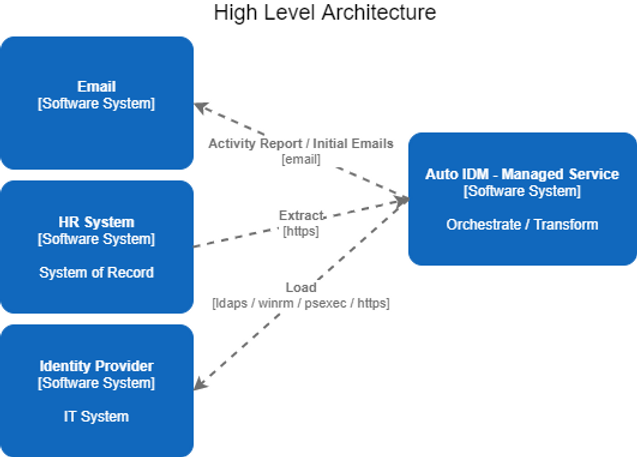
High level architecture
Access wise we need:
- Email address to send reports to
- HR system access
- Identity provider access
We either do compute inside our secured infrastructure, or we can deploy an agent to a server inside of your infrastructure. This agent reports back metadata about the job. Each customer has data isolated, and access to data is logged. We pride ourselves on finding errors before our customers find them, and work to detect all problems before they are noticed. In the event that we detect an issue, we create a ticket to let you know about the issue and any remediations we put in place.
Technical details
- All passwords are stored in an encrypted form via AKS (Amazon Key Service)
- Data isolation is achieved with network isolation techniques and AWS IAM rules
- Jobs are ran as scheduled batch runs
- Jobs can be run in real time (HR system dependent)
- All employee changes are treated as events which gives us the ability to go back in time to see how changes were made and why they were made
How to get in contact with Auto IDM
If this is interesting to you, or if you would like to chat about other ways we could partner to build a relationship, set up a meeting at www.autoidm.com/scheduling or email us at sales@autoidm.com.
Definitions
HR: Human Resources
Human Resources or HR.
IT: Information Technology
Information Technology or IT.
HRIS / HRMS: Human Resources Information System / Human Resource Management System
Human Resources Information System (HRIS) or Human Resources Management System (HRMS) is the name for your organization's system of record for an employee. When an employee gets hired, this is the first system data is entered into. This is the center for other related HR activities like payroll, benefits, time tracking, and more.
Common providers are BambooHR, Gusto, Namely, ADP Workforce, UltiPro, Ease, and more.
Identity Provider (IdP)
Your identity provider is the place your IT team uses to give your employees an account to log into their computer and is now normally used for email as well.
For a more technically accurate definition, check out https://en.wikipedia.org/wiki/Identity_provider.
Common providers are Active Directory, Microsoft 365 (Azure AD), Google Workspace, and more.
Identity Management (IdM)
Identity Management is where Auto IDM gets its name from. Generally, IDM and IAM (Identity Access Management) are used interchangeably.
System of Record
Authoritative data for some kind of data element. In this case name, title, department, and more are all more than likely authoritative in the HR system. For a more complete definition, check out https://en.wikipedia.org/wiki/System_of_record.